
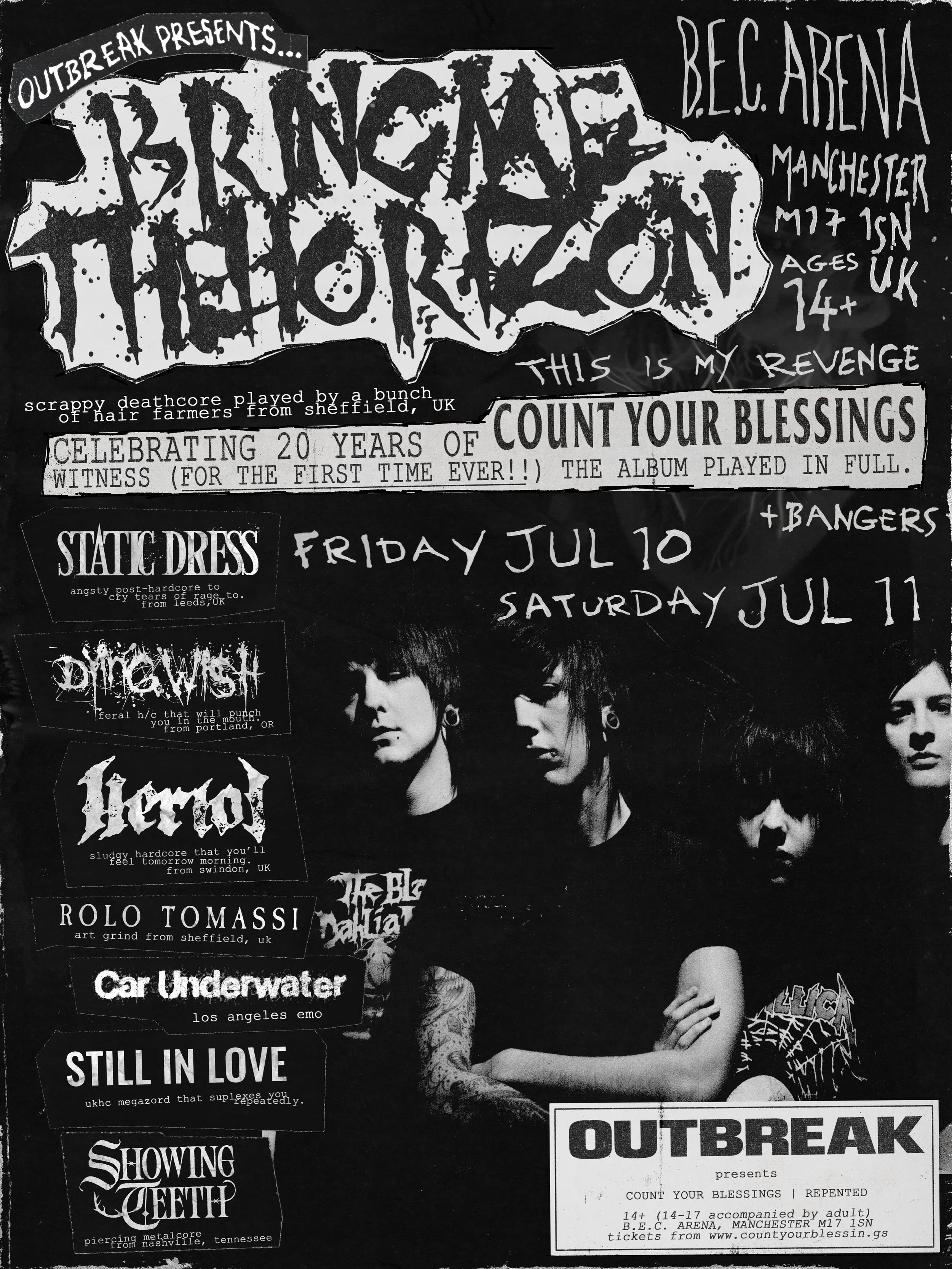
Outbreak Presents Count Your Blessings | Repented
How to create an account on DICE
This event is exclusively on DICE. If you don’t already have an account, we recommend you creating one and downloading the app before tickets go on sale.
Here’s how to create a DICE account on your phone.
Download the DICE app.
Open it, and then enter your phone number (to change the country code, click on the flag for a drop-down menu with more options).*
Please provide your full name as it appears on your ID, your email address and your date of birth.
When you’ve filled out all the details, click Create Account – then you’re all set.
How to create an account on the DICE website
It’s always better to create your account on the app, because you’ll need the app to access any tickets you buy.
But, if you’d still like to set up your account on our website, here’s how.
Head to www.dice.fm.
In the top right-hand corner, click Log In.
Enter your phone number (to change the country code, click on the flag for a drop-down menu with more options).*
We’ll text you a four-digit code – enter it to validate your device.Please provide your full name as it appears on your ID, your email address, and your date of birth.
When you’ve filled out all of the details, click Create Account – then you’re all set.
FAQs
-
No knives or weapons
● No drugs including ‘legal highs’
● No aerosols, sprays or pressurised containers permitted
● No glass
● No alcohol or liquids of any kind
● Admission is subject to search
● No under 14’s. 14-16 year olds must be accompanied by a responsible guardian aged 18 or over. (Maximum of 4 under 18’s per responsible guardian).
● Shop bought sealed packaged food is allowed
● No perfumes or aftershave
● No dogs or pets of any kind
● No flares or fireworks
● No drink of any kind [empty plastic refillable bottle are allowed – no metal bottles, free water points are located at the festival]
● Sun cream or lotion sized at 200ml or less in original containers, vape liquid, and eye drops in standard plastic 10ml containers will be allowed but contents may be tested on arrival.
● No laser pens or pointers
● No professional cameras, including professional camera equipment (e.g. camera stand, lenses, and selfie sticks)
● No audio recording equipment, noise-making devices
● No rollerblades, hover-boards, scooters, bicycles, skateboards and other personal motorised and non-motorized vehicles.
● No unauthorised solicitation or marketing materials (e.g, handbills, flyers, stickers)
● No drones or unmanned aerial systems
● No high visibility vests or coats
● No large bags or suitcases (small bags / small handbags / small backpacks / small waist bags are allowed into the festival.)
● No Selfie-Sticks
● Filming and photography in the gate areas is not allowed.
-
Bowlers Exhibition Centre, Longbridge Road, Trafford Park, Manchester, M17 1SN
https://maps.app.goo.gl/fHjnrzEBSPCqJXxq9
-
12:00pm
-
Queueing will begin from 10:00am on show day.
Camping is strictly prohibited anywhere near the venue. Anyone found to be camping will be moved on.
Fan numbering will not be acknowledged. Order of first entry will be selected at random.
-
We will be employing a “Challenge 25” scheme so Under 18’s (or those who look under 25) must bring an official ID (passport, photo drivers licence etc).
-
If your camera has a detachable lense it will not be permitted into the event without appropriate accreditation arranged in advance. Go Pros, selfie sticks etc are also not permitted.
Other cameras such as disposable / point & shoot are permitted at your own risk.
-
Yes 14+, anyone aged 14-17 must be accompanied by a responsible adult at all times.
-
No, we have a fully licensed bar at the event. We would encourage everyone to bring a re-usable plastic water bottle for drinking water.
-
You can bring shop bought sealed packaged food only (medical exemptions apply).
-
Yes, we have plenty of great food traders at the event who will be running throughout the event. There will be gluten free options also available. Many will cater for specific dietary requirements.
-
Yes, we allow re-entry at the event as many times as required. You will be subject to ticket checks, searches and may have to queue again to re-enter. Final entry to the event is 8pm.
-
Yes - 2 for 1 PA scheme, accessible toilets and viewing area available.
Please contact us at ticketing@outbreak-fest.co.uk with the subject “BMTH Disabled access” in advance of the event.
There are limited access tickets available, which are on a first come first serve basis.
-
Try to leave as many valuables at home as possible. For any valuables that you absolutely have to bring with you we recommend using the on site cloakroom.
-
There is no parking at the venue. However there is a car park with 341 spaces at the park and ride which is free with any Manchester tram ticket. The address is: Trafford Park, Stretford, Manchester, M17 1QR
-
Dice is the only site to purchase tickets for this event.
Please check your Dice app for your e-ticket.
-
Unfortunately unless the event is cancelled we are unable to offer refunds.
Dice offer a face value resale feature, find more information here.
-
General:
info@outbreak-fest.co.ukTicketing:
ticketing@outbreak-fest.co.uk